The threat
An agent that acts for you holds your credentials, reads input from sources you do not control, and runs commands with whatever access you gave it. What makes it useful is what makes it dangerous. It acts without asking. A hidden instruction in a chat message, an old comment in a shared document, or an email you never opened is enough to turn a helpful assistant into one that leaks your password or changes a file you forgot it could touch.
Wirken puts a verified boundary between the agent and anything that could matter. Reading runs free. Actions that change something ask the first time, then remember. Anything that deletes, installs, or touches your credentials always asks. Every decision is recorded so you can go back later and see exactly what happened.
Install
Linux and macOS:
  curl -fsSL https://raw.githubusercontent.com/gebruder/wirken/main/install.sh | sh

Windows: docs/windows.md

Verify the installer first? See /wirken/install.html.
What's in the box
Ten channels: Signal, WhatsApp, Telegram, Matrix, Discord, Slack, Teams, Google Chat, iMessage, and a web chat. Sixteen skills your agent can use, from coding tools to notes and weather. One agent, one sealed log, one vault. Each channel runs separately and holds only its own credentials, so if Slack is compromised, your Signal credentials stay safe.
The switchboard
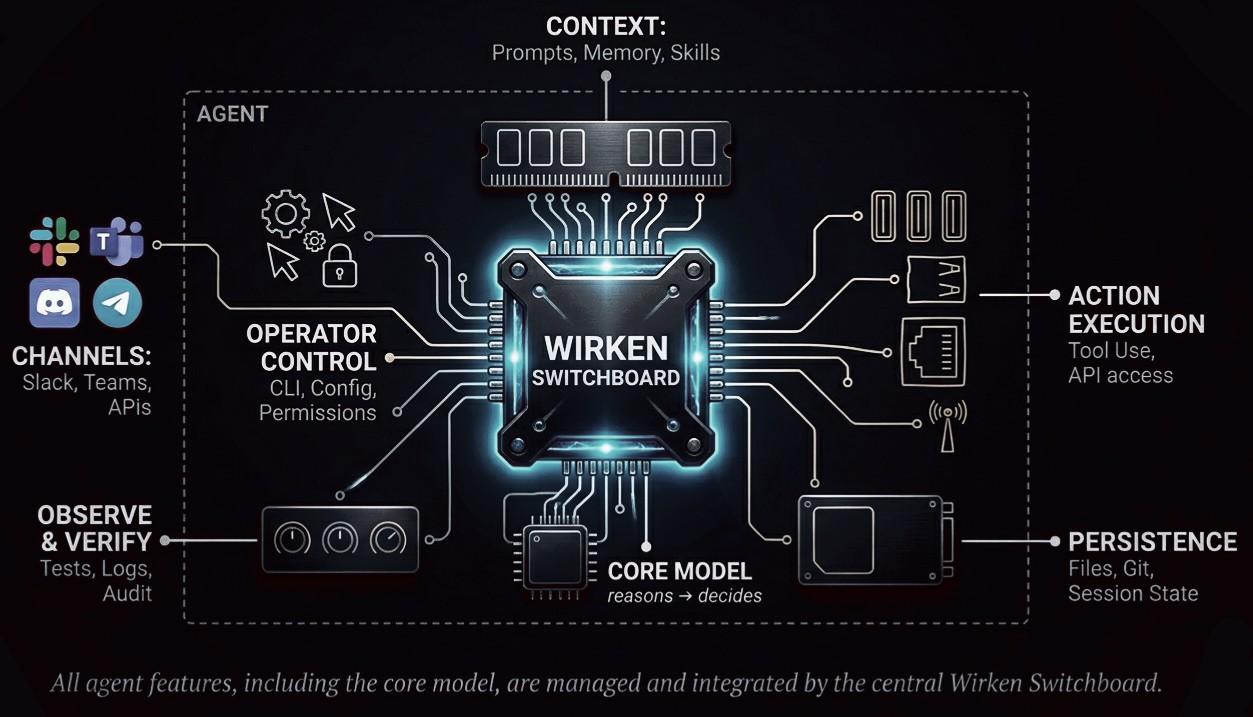
Every step verifies who is talking. Channels reach the agent only after they identify themselves. You can run one agent for everything, or a different agent for each channel, each with its own model and credentials. The agent only touches the outside world through tools you approved. The log of everything that happened is sealed with a signature only your install can produce.
Policy is text
Each skill is a plain text file that starts with a few lines of rules. The git skill, in full:
---
name: git
description: Git version control operations
permissions:
  tools:
    allow: [exec]
  egress:
    mode: deny
  inference:
    allow: ["*"]
---
Eight lines you can read at a glance. This skill can run commands on your computer but cannot reach the internet, and can use any AI model. No special language to learn, no separate config file. The file itself is the rule.
The audit log
Every action the agent takes is recorded as a sealed entry in a log that can never be erased or rewritten silently. You can check the whole log without an internet connection:
$ wirken audit verify
  Audit log integrity: OK
  1234 rows verified across 7 sessions, hash chain intact.
  Chain-head signatures: 24 verified.
  Signing key ids seen: a3f2...
If anyone changes a single entry, the seal breaks and the check fails. The seal at the top of the log was made with a key only your installation holds. Replay any past action and confirm it produced the same result the log says it did.